Showing posts with label productivity. Show all posts

Tuesday, September 20, 2022

Fonts, Syllabi, and Poop | TAPP 123


Host Kevin Patton revisits the concept of using the syllabus and other course documents to build a positive and productive course culture. Poop—it's everywhere! Does the font or typeface we use affect students—especially regarding learning and memory? We look for answers in this episode!

00:00 | Introduction

00:52 | Revisiting the Syllabus

16:28 | Poop. Poop. Poop.

19:00 | Sponsored by AAA

19:59 | Fonts Are Important in Teaching & Learning

30:54 | Sponsored by HAPI

31:57 | Desirably Difficult Reading?

42:00 | Sponsored by HAPS

43:00 | Fluent & Dysfluent Fonts

56:12 | Staying Connected


★ If you cannot see or activate the audio player, go to: theAPprofessor.org/podcast-episode-123.html

🏅 Apply for your credential (badge/certificate) for listening to this episode: theAPprofessor.org/podcast-episode-123.html/#badge

❓ Please take the anonymous survey: theAPprofessor.org/survey

☝️ Questions & Feedback: 1-833-LION-DEN (1-833-546-6336)

✔️ Follow The A&P Professor on Twitter, Facebook, Blogger, Revue, Tumblr, or Instagram! @theAPprofessor

📰 Get the thrice-weekly TAPP Science & Education Updates theAPprofessor.org/updates


Typography must often draw attention to itself before it will be read. Yet in order to be read, it must relinquish the attention it has drawn. (Robert Bringhurst)


Revisiting the Syllabus

15.5 minutes

Creating and nurturing a course culture can be influenced by our syllabus and other course materials. We revisit this idea with a few more tips and tweaks.

Anatomy &; Physiology Syllabus: It's an Art | TAPP 120

Are We Answering Student Questions? | Science Updates | TAPP 92

★ Wendy Riggs has a huge collection of anatomy, physiology, and general bio, instructional videos she uses in her flipped classes youtube.com/user/wendogg1

★ Natalie Wade has engaging short videos about A&P content and study tips at The Anatomy Gal youtube.com/c/TheAnatomyGal

★ Jamie Chapman has a collection (Chapman Histology) of short (under 3 minutes) videos guiding students through lessons in histology youtube.com/c/ChapmanHistology
Fonts, Syllabi, and Poop | TAPP 123


Poop. Poop. Poop.

2.5 minutes

After releasing The Poop Episode | Using Fecal Changes to Monitor Health | TAPP 121, I learned of a whole movement of poop listening on smart speakers. And that there are actually poop songs that are viral hits. Really.

★ When kids yell 'Alexa, play poop,' you'll hear these songs (story from All Things Considered on National Public Radioo) AandP.info/wv2

The Foot Book (Bright & Early children's book by Dr. Seuss; can be read as The Poop Book) geni.us/afvGc

★ CHOC Stool Diary AandP.info/4yq

★ Bowel Symptom Journal (from Alberta Health Services) AandP.info/6fw

★ Poop Apps: 5 Tools for Tracking Your Stools AandP.info/5ow


Sponsored by AAA

56 seconds

A searchable transcript for this episode, as well as the captioned audiogram of this episode, are sponsored by the American Association for Anatomy (AAA) at anatomy.org.

Searchable transcript

Captioned audiogram 

Don't forget—HAPS members get a deep discount on AAA membership!

AMERICAN ASSOCIATION FOR ANATOMY STATEMENT OF RESPONSIBILITY FOR ITS HISTORY OF RACISM (Press release from AAA, giving the full text of the statement) AandP.info/eei

AAA logo


Fonts Are Important in Teaching & Learning

11 minutes

At the suggestion of listener Dr. David Curole, we examine the roles that different fonts can play in teaching, learning, and memory. This segment reviews some past discussions of fonts, then introduces some new concepts of using fonts in teaching. Featured is a Word Dissection of the terms fluent font and dysfluent (disfluent) font.

Communication, Clarity, & Medical Errors | Episode 55

Anatomy & Physiology Syllabus: It's an Art | TAPP 120

Why Anatomy & Physiology Students Need Sectional Anatomy | TAPP 116


Sponsored by HAPI Online Graduate Program

59 seconds

The Master of Science in Human Anatomy & Physiology Instruction—the MS-HAPI—is a graduate program for A&P teachers, especially for those who already have a graduate/professional degree. A combination of science courses (enough to qualify you to teach at the college level) and courses in contemporary instructional practice, this program helps you be your best in both on-campus and remote teaching. Kevin Patton is a faculty member in this program at Northeast College of Health Sciences. Check it out!

northeastcollege.edu/hapi

Logo of Northeast College of Health Sciences, Human Anatomy & Physiology Instruction

Desirably Difficult Reading?

10 minutes

The article How Fonts Affect Learning and Memory by Carla Delgado takes our conversation a step further by looking the potential role of dysfluent fonts in learning.

★ How Fonts Affect Learning and Memory (article in Discover Magazine by Carla Delgado mentioned in this segment) AandP.info/wof

★ A Review of the Cognitive Effects of Disfluent Typography on Functional Reading (review article from The Design Journal) AandP.info/mwt

★ Fortune Favors the Bold (and the Italicized): Effects of Disfluency on Educational Outcomes (article from Proceedings of the Annual Meeting of the Cognitive Science Society) AandP.info/jjt

★ Changing Fonts in Education: How the Benefits Vary with Ability and Dyslexia (article from The Journal of Educational Research) AandP.info/yt4

★ Fluency and the Detection of Misleading Questions: Low Processing Fluency Attenuates the Moses Illusion (article from the journal Social Cognition) AandP.info/jul


Sponsored by HAPS

56 seconds

The Human Anatomy & Physiology Society (HAPS) is a sponsor of this podcast.  You can help appreciate their support by clicking the link below and checking out the many resources and benefits found there. Watch for virtual town hall meetings and upcoming regional meetings!

Anatomy & Physiology Society

theAPprofessor.org/haps

HAPS logo


Fluent & Dysfluent Fonts

13 minutes

We identify some potentially fluent fonts, as well as a few dysfluent fonts (see image below or at AandP.info/ihy). Sans Forgetica font was developed specifically to be dysfluent in a way that promotes remembering what is read. Does it work? Should we incorporate dysfluent fonts in our teaching materials?

★ Fonts and Fluency: The Effects of Typeface Familiarity, Appropriateness, and Personality on Reader Judgments (thesis by Tim Wang) AandP.info/0hf

★ Previously claimed memory boosting font 'Sans Forgetica' does not actually boost memory (story from ScienceDaily) AandP.info/zp4

★ The science of Sans Forgetica - The font to remember (video from the creators of Sans Forgetica) AandP.info/ox5

★ An unforgettable year – Sans Forgetica turns one (article from the RMIT University website) AandP.info/fo3

★ Sans Forgetica: Study Mode by RMIT University (plugin for Chrome browser lets you read any web page in Sans Forgetica) AandP.info/fc3

★ Sans Forgetica (free download for personal use) AandP.info/o4g

★ Can very small font size enhance memory? (article from journal Memory & Cognition) AandP.info/rlk

★ Sans Forgetica is not desirable for learning (article from the journal Memory) AandP.info/hmu

★ The role of font size and font style in younger and older adults' predicted and actual recall performance (article from
Neuropsychology, development, and cognition. Section B, Aging, Neuropsychology and Cognition) AandP.info/r6s
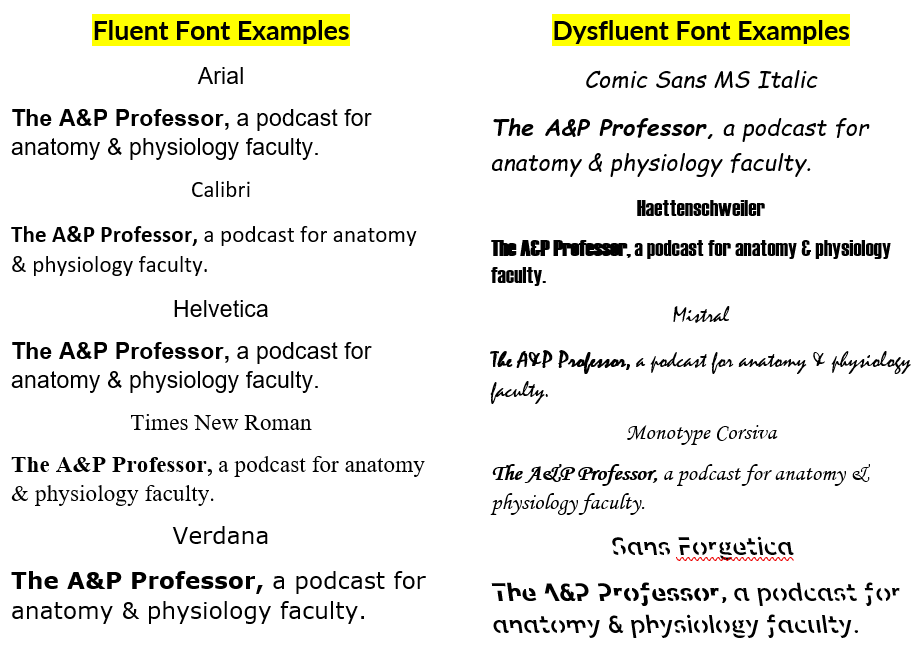
samples of fluent and dysfluent fonts


People

Contributors: David Curole, Terry Thompson

Mentions: Wendy Riggs, Natalie Wade, Jaime Chapman, Robert Bringhurst, Carla Delgado

Production: Aileen Park (announcer), Andrés Rodriguez (theme composer,  recording artist), Rev.com team (transcription), Kevin Patton (writer, editor, producer, host)


If the hyperlinks here are not active, go to TAPPradio.org to find the episode page.

★ More details at the episode page: theAPprofessor.org/podcast-episode-123.html

★ Transcript available in the transcript box: theAPprofessor.org/podcast-episode-123.html

★ Need help accessing resources locked behind a paywall? Check out this advice from Episode 32 to get what you need! my-ap.us/paywall

Take The A&P Professor experience to the next level!

theAPprofessor.org/community

Earn cash by referring other A&P faculty to this podcast:

theAPprofessor.org/refer

Tools & Resources

★ TAPP Science & Education Updates: theAPprofessor.org/updates

★ Amazon: amzn.to/2r6Qa3J

★ Text Expander: theapprofessor.org/textexpander

★ Rev.com: try.rev.com/Cw2nZ

★ Snagit & Camtasia: techsmith.pxf.io/9MkPW

★ Krisp Free Noise-Cancelling App: theAPprofessor.org/krisp

★ JotForm (build forms for free): theAPprofessor.org/jotform

★ QuillBot (writing tools): theAPprofessor.org/quillbot

★ The A&P Professor Logo Items: https://www.teepublic.com/stores/the-a-p-professor

Sponsors

★ Transcript and captions for this episode are supported by the American Association for Anatomy | anatomy.org

★ The Human Anatomy & Physiology Society provides marketing support for this podcast | theAPprofessor.org/haps

★ Distribution of this episode is supported by the Northeast College of Health Sciences online graduate program in Human Anatomy & Physiology Instruction (HAPI) | northeast.edu/hapi

Clicking on sponsor links helps let them know you appreciate their support of this podcast!

Follow The A&P Professor on  Twitter, Facebook, Blogger, Revue, Tumblr, or Instagram @theAPprofessor

The A&P Professor® and Lion Den® are registered trademarks of Lion Den Inc. (Kevin Patton)

As an Amazon Associate I earn from qualifying purchases. I may be compensated for links to sponsors and certain other links.


Click here to listen to this episode—or access the detailed notes and transcript.

Monday, August 6, 2018

EVEN MORE Tricks for Retention & Success in Online Courses | TAPP Episode 23


Medical mitochondria (4 min)
Syllabuses: I need your help (1 min)
Review of first two parts of this series (3 min)
Featured: EVEN MORE Tricks for Retention & Success in Online Courses (18.5 min)


If you cannot see or activate the audio player click here.
Follow The A&P Professor on Twitter, Facebook, Blogger, Nuzzel, Tumblr, or Instagram!

(0:42) New research proposes using mitochondria isolated from healthy tissue in a patient's body to treat ischemic heart muscle and perhaps other dysfunctional tissues or organs.

mitochondria


(4:44) Syllabuses, syllabi. Whatever. It's almost time to think about tweaking our course documents for the fall semester. I'll cover that in an upcoming episode, so I need you to send your contributions now!
  • Please share your syllabus ideas, questions, or comments at:
    • 1-833-LION-DEN or 1-833-546-6336
    • podcast@theAPprofessor.org


(5:55) It's too long for one episode, so it's a series of three episodes: 21, 22 (previous episodes), and 23 (this episode).
If you're not teaching online now, you will be someday! Most of these tips apply to face-to-face courses, anyway.
In  the previous two episodes, Kevin suggested:
  • It's all about connections.
  • Cultivate a friendly, informal, and supportive "online teaching persona"
  • Express empathy, don't just have empathy.
  • Use customer-service skills when communicating with students
  • Use our own pain points and frustrations to tap into how our students might feel
  • How we can literally make our online course a face to face course
  • How to use faces, voices, and scheduled course announcements to enhance the connections necessary to retain students and promote student success.

 (8:47) Online courses are notorious for high dropout rates and high failure rates, compared to traditional face-to-face classes. Kevin continues to share even more strategies he has found to work in creating and nurturing the kinds of connections that help retain students and support their success in the course.
This episode focuses on:
  • Why reaching out to individual students who may be at risk is important--and how to do that.
  • Why feedback to students is important in nurturing connections.
  • Some final thoughts.
communicating online
If you experience a repeated section starting about about timestamp 21:36, it's not your imagination. Probably. A pre-release version had such a hiccup and it may have been downloaded into your app. If so, you can simply re-download in the app. Or enjoy twice the fun by leaving the repeat in there!
If the hyperlinks here are not active, go to TAPPradio.org to find the episode page.
Amazon referrals help defray podcasting expenses.

Click here to listen to this episode—or access the detailed notes and transcript.

Monday, January 2, 2017

Checkmarks Make Me Happy

http://my-ap.us/2hBvIVL
It's true. Like most of you, I have a long list of tasks that need to be done in any one day or week.

I am pretty good about remembering what I have to get done by when, what I've already finished, and what has just been added to my plate. But my brain is not 100% reliable with that, so I make lists.

Sometimes these are lists on my computer desktop or in my online Task List. But those are too easily hidden. I have to see them to be reminded. So I often make paper lists. There is something very satisfying about having the kinesthetic experience of physically ticking something off my list with my trusty green pen.

I was talking about this last summer when I was presenting a bunch of practical tips to help textbook authors stay on track at the Textbook and Academic Authors conference. During the talk, my buddy Mike Kennamer tweeted, "'Checkmarks make me happy...' Kevin Patton". When I saw that tweet later in my Twitter feed, I chuckled that he took this out of the discussion—but I also realized how important a point that it is.

Whether it's a textbook revision or a long semester of teaching A&P, those little surges of dopamine that happen when we can check something off our lists really do help keep us motivated.  Seeing the progress we are making as we add ticks to our checklists provides some additional satisfaction, which also helps keep us going.

checklist with green checksAnd checklists also keep us from forgetting important things to do.

In an online course I teach, it's easy to forget what needs to be graded each week because there are no stacks of tests or papers sitting there on my desk glaring at me. Those assignments are hidden away on a server somewhere and I need to intentionally call them up to grade them. So I need a checklist. the one pictured here lists grading duties organized by module (we have two-week modules A, B, C,...) and by week.

Each Friday, during my scheduled grading session, I look at my checklist. I note that, even though it may not always feel like it, the trimester is actually progressing. And I see what I need to grade this week. And—hooray!—I get to check it off my list when I'm done. What a great way to start the weekend, eh?

I recently posted my grading checklist in that online course. It's a bit late for this last term, but next time I teach the course, my students can print out my checklist to help them keep track of what they've submitted each week. Sure, they have a syllabus. Like they're going to use that to make their own list? Really? What planet do you live on?

What can we use from this in teaching undergraduate A&P?


  • Grading checklists help us make sure that no graded assignments fall through the cracks.

  • Grading checklists provide happiness and motivation. At least a little.

  • Scheduled grading sessions help us keep up with our grading tasks, preventing them from piling up and disturbing our mental health.

  • We can share grading checklists (and an exhortation to use them) with students to help keep them on track—and stay motivated.


Monday, September 29, 2014

No Red Pens!

Red F grade

All teachers use red pens to grade student work, right?  Not this teacher.  I haven't used a red pen in over a decade.  I have strong reasons for that.

Many years ago, I happened to be scanning some information about research on the psychological effects of colors.  I was planning a major overhaul of my writing studio and wanted to find a paint color that would not interfere with my focus and productivity—or perhaps even enhance my productivity.  That's when I ran across something that pointed out some unintended adverse effects of using a red pen for grading student work.

As we all know, red is an alarm color.  Red signals danger, right?  So it's alarming—perhaps downright scary—to see red.  That works great when you are designing a stop sign or painting an alarm box.  But perhaps it's not so great when you are trying to provide helpful feedback.

Yes, I know that red ink stands out from the black or blue ink in student work so it can be easily distinguished.  But you know what?  So does green ink!

I've found that making comments in green, whether praising a great effort or correcting an error, has an overall positive effect on reactions by my students.  Green is the color of growth and reassurance, after all.  A whole different signal than red's message of danger and anger.

There's some evidence that blue ink may be a better choice.  But some of my students use blue ink themselves, so my comments would blend in too much. I've had good luck with green, so I'm sticking with it for now.

It may just be that by switching to green ink, it was me that changed.  Perhaps every time I grade with a green pen, I'm reminded that I want to be nurturing and positive in my feedback—not mean and condescending.

Don't take my word for it!  Try it yourself.  I realize that this seems silly and trivial, but it works. I doubt whether you'll go back to red for grading again.


What can we use from this in teaching undergraduate A&P?


  • Grading papers and assigning grades in green sends a nurturing signal, not an angry message.
  • Providing written feedback in green to colleagues (peers, supervisors, subordinates) maintains a positive, constructive tone rather than an angry tone.

Want to know more?


Color and psychological functioning: The effect of red on performance attainment.

  • Elliot, A J. et al. Journal of Experimental Psychology: General, Vol 136(1), Feb 2007, 154-168. doi: 10.1037/0096-3445.136.1.154
  • Research reporting a negative effect of using red in learning situations.
  • my-ap.us/1qhNrNp

EFFECTS OF FOUR PSYCHOLOGICAL PRIMARY COLORS ON ANXIETY STATE. 

  • KW Jacobs and J. Suess Perceptual and Motor Skills 1975,Volume 41, Issue , pp. 207-210. doi: 10.2466/pms.1975.41.1.207
  • Research article showing that red tends to increase anxiety levels in undergraduates.
  • my-ap.us/VR3vud

Parents to teachers: No more red pencils

  • Associated Press. 4 March 2005
  • Article on reactions to grading in red.
  • my-ap.us/1vnk7JG

Red Ink May Lead to Lower Grades

  • Guy Raz National Public Radio 29 May 2010
  • Audio reporting on the unintended effects of color use in grading—actually affecting the grade.
  • my-ap.us/1rAJR4M

School Bans Teachers From Using Red Ink Because Everyone Knows Red Ink Is Mean

  • Maria Guido Mommyish 20 March 2014
  • Blog post by a mom reacting to a local school's ban on grading in red ink.
  • my-ap.us/1lwvV9v

Update


Monday, September 15, 2014

Updated Cell Transport Slides


Many longtime readers of this blog know that I have a set of animated PowerPoint-compatible slides available for you to use FREE in your A&P classes.  These slides—the Lion Den Slide Collection— supplement the publisher-supplied slides or homegrown slides that you are already using.

I recently updated, improved, and expanded the set of slides that animate several key cell transport processes such as diffusion, osmosis, endocytosis, etc.

If you've accessed the Lion Den Slide Collection in the last several months, you've already registered in the system and probably have already received an email notification of the update.

If you're new to the collection (or accessed it before June 2014) then you need to go to the Lion Den Slide Collection page and click on the link to the form.  It takes a few steps, but by filling out the brief forms you register for a service that will notify you (if you want it) of any updates or additions to the collection.

Here is a preview the newly updated Membrane Transport Animations
Click image for download

When you download the linked file, you'll be able to play it in PowerPoint or any other program that plays "show" or PPTSX files.  The slides can only be viewed, not edited or added to your own slide deck.  To do that, you must download the fully editable PPTX files from the Lion Den Slide Collection

Once you download any slide deck from the Lion Den Slide Collection, you can mix and match them to blend them with your existing presentations.  You can also alter the content or timings to suit your needs.  

I'm hoping you'll also get some ideas from them to create new additional slides!  If you modify, create, or already have any slides (for which you own the content) that you want to place in the collection for sharing, please contact me directly. 

Want to know more?


Presentation Zen
  • Kevin Patton The Electronic Professor 6 August 2014
  • The zen approach to presentations.  Includes a video and links to resources.
  • my-ap.us/1mZjY7e

Are your students dodging bullets?
  • Kevin Patton. The Electronic Professor. 28 July 2011
  • My blog article on improving slide presentations.  With illustrated examples.
  • my-ap.us/1ni8c72

Handling bullets safely
  • Kevin Patton. The Electronic Professor.  3 August 2012
  • Another of my blog articles on improving slide presentations. Includes my own video on how to trim down those wordy slides to something that actually works in a slide.
  • my-ap.us/1ooEced

Monday, August 11, 2014

Start A&P 1 with a Comprehensive Exam. Really.


A while back, I recommended starting the second semester of A&P 2 with an exam. In that article, I stated that it's a good opportunity to get everyone started on the right track—and on the same track—before jumping right back into it.

If you think about it, even the first semester of A&P is "jumping back into it."  That is, if we assume that our students have had some learning in biology already.  Don't we want them to already know at least a little bit about:
  • basic chemistry (like what an atom is)
  • cell biology (at least what a cell is and perhaps a few organelles)
  • scientific terminology (like what roots, prefixes, and suffixes are)
  • genetics (what a gene is, what DNA stands for, basic inheritance)
  • metric system (at least the basics)
  • main organs of the body (like what a muscle or stomach is)
Then why not start them off with an open-book online or take-home exam covering these topics?  Or more topics?  Or fewer?

By starting off with a low-pressure "open" exam, we accomplish several goals:

  • Students learn how we will be testing them.  
    • They'll become comfortable with the formats we use for test items, how our LMS quizzes work, how to fill out an exam book (or scan sheet or test paper), our personal quirks in testing, the depth and breadth of our assessments, and more.

  • They review-refresh-solidify their prior learning.  
    • The "review exam" is a learning experience in and of itself, making sure that students fill in any gaps that may have occurred since they last encountered these concepts—even if they finished their last bio course only a few weeks ago.

  • Solves the "we don't have a prerequisite for A&P" problem.  
    • Well, it doesn't completely solve it.  But it does put quite a dent in it.

  • Allows students to work at their own pace to catch up.
    • Some students will breeze through their review.  Others will wonder how they missed (or forgot) all these concepts.  Still others have challenges in learning, reading, remembering, using English, and more.  This will help even out the playing field, at least at the start of the game.

  • You won't have to wonder what they've learned before reaching you.
    • The review will ensure that they know the concepts you want them to know before they begin.  And which terminology you'll using.

  • Saves you time in your course.
    • By not having to stop and review basic concepts when your students stumble, you have more class time for learning activities.

  • Students will have less of that oppressive, overwhelming feeling of stress a few weeks into A&P.
    • Many students, especially returning learners, feel like they are drowning because of the pace and sheer volume of information in their A&P course.  But a review exam can get a lot of that "you should already know this"— "I should perhaps, but I don't"—stress out of the way from the get-go.

  • Gives students confidence as they face their new challenges in your course.
    • This one cannot be overstated.  Much of our success in learning comes from how confident we are in our preparedness and our abilities.  A review exam can be a positive learning experience that establishes a good attitude for learning from the beginning. And it won't be false confidence—they really will know the foundational concepts they need for success in A&P!


Want to Know More?


Start A&P 2 with a Final Exam

  • Kevin Patton. The A&P Professor.   21 Jan 2013
  • My previous article on using the first exam in the second semester of A&P to review, refresh, and solidify concepts from A&P 1.
  • my-ap.us/1lKVnTh


Teaching as Testing
  • Kevin Patton. The Electronic Professor 27 Feb 2009
  • Article outlining my use of randomized online testing as a mechanism of needed practice.  Includes links to a full video presentation.
  • my-ap.us/p3rM6B

Practice. Practice. Practice.
  • Kevin Patton. Lion Tamers Guide to Teaching 3 Dec 2010
  • Article on the role of practice in teaching and learning, using the analogy of taming lions.
  • my-ap.us/WjNHLn
Image credit: kelvinsong

Monday, July 28, 2014

Syllabus Resources for A&P


Fall is the traditional start of the academic year, so as we approach that mark it may be a good time to think about ways to tweak our course syllabus in ways that may promote student success.  There are some "teaching moments" in a syllabus that we don't want to miss!

I have few suggestions for you to consider.

Chunking

Experts call it excessive cognitive load and I say it's just plain rude to put all your policies, procedures, advice, and explanations in one or two big lumps, then expect students to actually read it and be familiar with the contents.

Go ahead and get it all down there—then chunk it by dividing it up into short sections, each with a short, descriptive heading.  Next, rearrange all your newly chunked sections into logical groupings with a short descriptive heading.  Now students will more likely read through it all, comprehend it better, and be more likely to refer to the syllabus before emailing you with their questions that can easily be answered by the syllabus.

Deadlines

We often blame it on which generation's pesonality they are ruled by—X, Y, millenial, baby-boomer—but I think it's just human nature to miss deadlines when you are unaware of the effects of doing that.

A syllabus is a good place to establish deadlines in a course, of course, but it's also a great place to briefly explain why deadlines are important.  You may want to get some ideas from this brief article—or simply link to the article from your syllabus:

Academic Integrity

The most effective deterrent against academic dishonesty—cheating—is to promote a culture of honesty in your course.  The syllabus is a great way to get that on the right footing at the outset.  Here's an example from one of my syllabi, in a chunked section titled Academic Integrity:
This course relies on the principle that all who participate will do so with the honesty befitting adult, professional studies.  Without integrity of all students, the integrity of the course, this school, and your own credentials all suffer. This means that all students are expected to submit only their own work, whether for assignments, papers, online tests or quizzes, in-class tests or quizzes, or any other component of this course.  Thus, students may not receive inappropriate help nor give inappropriate help to other students.
 SCC academic integrity policies outlined in the Student Handbook and other documents stipulate a variety of possible outcomes of violation of principles of basic academic integrity.  
In this course, receiving or giving inappropriate help in online tests, in-class exams, or assignments will ordinarily result in receiving "F" for the course.  Inappropriate help may include having someone do all or part of the work for you, providing or receiving copies of current in-class exam items or answers to in-class exam items, and copying someone else's work and submitting it as your own.  
Students who witness or have reason to suspect violations of academic integrity in this course and do not report it promptly, thus further enabling the dishonesty, will themselves also be subject to disciplinary action.
I strongly suggest that you read the brief article Why be honest?
Feel free to adapt this (perhaps shorten it a bit?) for your own syllabus.  Or use this link—  my-ap.us/zHHd7H —in your syllabus to simply send them directly to an article that explains it all.

Handcrafted Uniqueness

This is kind of silly—but that's the point.  I always include something like this in each and every syllabus:
Minor imperfections further enhance the  handcrafted uniqueness of this document.
It's a joke, right?  Well, sort of.  It's actually true, and so it is fair warning that there are bound to be mistakes in my syllabus. But it's also lighthearted enough to set the light, informal tone that improves student engagement and openness to a new instructor and a new course.

For more ideas like this, check out Professors are from Mars, Students are from Snickers: How to Write and Deliver Humor in the Classroom and in Professional Presentations by Ronald A. Berk (Stylus Publishing, 2003)


Terminology

Students in the anatomy and physiology course are likely to learn more new "foreign" words than they would in a beginning Spanish, French, or German course.  So it's important to set that fact out there early, so that students can get a handle on that aspect of A&P from the get-go.

Besides a brief statement about the need to learn a new language in the syllabus, I've found it helpful to link to (or embed) these resources:


Spelling is Important

Your peritoneum is not your perineum, right?  And in a medical chart, that could get through all the checks and alerts even in today's "smart" electronic environment.  I, for one, am not willing to put my life—or my perineum—in the hands of a medical spell-checker.  So it's important that A&P students learn that an incorrectly spelled term term is an incorrect term.

I suggest spelling that out (pardon the pun) in the course syllabus.  Because not all instructors "take off for spelling," it may unnecessarily shock your students when misspelled terms are not accepted at all in A&P. If they know ahead of time that correct spelling of scientific terms is part of the course, they'll be more accepting of the idea and—even better—prepared for it.

Consider adding a link to the article Is Spelling Important? to your syllabus:

Renting or Borrowing Books

You may have trouble buying this one, I realize, but I can't tell you how many of my former A&P students have sold back their A&P textbook, or returned their rented book, or lent it out on permanent loan to a friend or relative.  And then regretted it.  Why? Because they need it for their health professions courses—and even in their jobs.  A good A&P textbook is not just a learning tool for use in the A&P course, it's a valuable addition to their own professional reference library.

I usually add a phrase like this to the list of required books and manuals for my courses:
Don't rent your A&P text book!  Click here for the reasons.
And don't sell it back at the end of the course. Here's why.
Here are the URLs if you want to use a similar approach—and save some students a bit of heartache when they realize they've lost a valuable resource they'll need later:
Rental URL my-ap.us/1rJKmHg
Sell-back URL my-ap.us/mhYggB

You may not agree with this approach.  Or perhaps your school rents or lends textbooks to all students and you can't officially go against that in your syllabus.  But it's an idea worth considering if you have the latitude to advise your students in this manner—and the insight to see the value of such advice.

The A&P Student

Lastly, there are a lot of A&P-specific study tips, tools, and advice available FREE for your students at my blog for students called The A&P Student.
  • Use this URL to link to it from your syllabus or course site: theAPstudent.org 
  • If your learning management system allows for an RSS feed in your course, why not add this one? my-ap.us/1otlNx2
  • If you want some FREE bookmarks for your students with the URL for the resource, click here. 

Photo credit: Handcraft

Wednesday, July 16, 2014

The Life Science Teaching Resource Community

Have you heard that the American Physiological Society (APS) has expanded their Archive of Teaching Resources into The Life Science Teaching Resource Community?

This new online community—LifeSciTRC for short—offers thousands of FREE resources that you can use in your A&P course!

This transition marks a culmination of efforts of APS and several other scientific societies to advance the Archive of Teaching Resources beyond an online library into a community of practice for life science educators at the K-12, undergraduate, graduate, and professional levels.

The LifeSciTRC offers more than 6,000 free, scientifically-accurate teaching resources along with many new tools that allow educators to share their ideas and teaching expertise including:
  • Community pages with news and recommended teaching resources
  • Blogs focusing on classroom and science topics relevant to educators
  • Forums for educator-led discussions
  • Resource rating and commenting areas where educators can share their experiences of using resources
  • Monthly newsletters highlighting community members, news, and resources
I can't speak highly enough of the quality and diversity of teaching resources available in the archive.  These are peer-reviewed submissions from all levels of teaching and learning.  Case studies, experiments, demonstrations, slide presentations—all kinds of great stuff!

The new system is really easy (and fun) to use.  It has a starred rating system, so you can see how others have rated each resource.  And you can earn badges by submitting and reviewing items.

In addition to the new name, the LifeSciTRC will feature three new scientific society partners:
  • The Physiological Society
  • Genetics Society of America
  • American Society of Plant Biologists
These societies will join the current partners:
  • APS
  • Human Anatomy and Physiology Society
  • Society for Developmental Biology
  • American Association of Anatomists
  • Massachusetts Society for Medical Research
  • Northwest Association for Biomedical Research
Educators looking for new teaching ideas or interaction with other educators are invited to visit LifeSciTRC.org and discover what they have to offer.

For more information, contact our colleague at APS, Miranda Byse, PhD, Program Manager at mbyse@the-aps.org or 240-743-8045.  Be sure to tell her where you heard the message!

Some content in this post came from APS

Friday, June 13, 2014

Online lectures and previews


For many years, I've been producing online lecture presentations as previews and supplements to the classroom experience in my A&P courses. Sometimes, I use these to keep "teaching" while away at a conference or meeting.

In 2006, long before "flipping" became a common phrase among professors, I decided to make my classroom more interactive by putting some of the "you don't really need me in person for this"  material online for preview before coming to class. I wasn't creative enough to call it something catchy and cool like flipping, but simply it "Preview Presentations." For each module in the course, students were required to watch these before coming to class for discussion, questions, and additional lecture presentations on the "hard to understand" concepts that require some back-and-forth between me and my students.

I summarized my case of putting interactive, narrated PowerPoints that include built-in self-testing quizzes in an online presentation on our companion website The A&P Professor.  That was a version of a well-received workshop I presented at a regional HAPS conference in Macon GA a few years ago.

Recently, I re-created my presentation to focus on the latest generation of software plugin that allows for video or audio narration and more types of interactivity in quizzes.

Rather than summarize my experience here and suggest ways that you might consider adapting some of it to your A&P course, I'll just give you the link to my presentation (using said technology) that includes a summary handout that you can print out:

Thursday, January 6, 2011

Lion Den Slide Collection

As you think about getting started in a new semester, you may find that sets of FREE animated slides might help you spice up your classroom presentations.

For the last several years, I sent a set of hundreds of slides from my Lion Den site for students to anyone who donated to keeping that site up and running.  But starting in this new year of a new decade of a (relatively new) century, I'm now opening up the "secret vault" for anyone who wants them.  And promises to use them for good and not evil.

If you go to the Lion Den downloads page and join the Lion Den, you'll get acccess to all the slide files.

Once you are in the download location, you can access the original set of slides in the folder marked  Lion Den Slide Collection Version 1.0. Newer and updated slide collections will be available in the folder Lion Den Slide Collection Version 2.0.  You can follow the links to the folders to see what's there, but you cannot download any of the slide sets until you fill out the form and get the super-secret password.

You can preview some of the slides by going to the Lion Den slide page.  However, not all the slides in the Lion Den Slide Collection are posted on that website, the slides are posted individually (not in sets), and they are in "slide show" format (which may not be fully editable by you).  The slide sets in the downloadable collection are in fully editable .ppt or .pptx format.  It's much easier to go to the Lion Den download page, join the highly-classified-super-secret membership roster and download the sets of slides.

All the slides can be freely used (and adapted) for noncommercial educational purposes (see the license embedded in the Notes section of each slide).

As the User Manual states, these slides are not necessarily as detailed (or as simplified) as you would like to use in your own presentation.  But because they are editable, you can change that, right?  Also, some of these slides were originally intended for a particular purpose (such as introducing a topic that will be explored more fully later).

Another thing to remember is that the slide sets are not meant to be a complete set of slides covering all topics of A&P.  In my classroom, I use a lot of images from the textbook (provided by the publisher).  The slides in the Lion Den Slide Collection are meant to be supplemental slides.

Keep in mind that the slide sets are NOT created by a professional graphic artist . . . just old Kevin hacking away in PowerPoint.  So they may not be as slick as some slides you've seen.

All the slides are in PowerPoint-compatible files.  The newer slides are in the newer XML PowerPoint format (.pptx).

Tuesday, December 28, 2010

Google Body Browser

My editor Jeff recently pointed me to a story about Google's recently launched Body Browser.  I was amazed at this latest creation of Google Labs.

The Body Browser is a FREE online tool that you and your students can use to explore the anatomy of the human body in a "virtual dissection" format.  Using the familiar Google Maps navigation tools, you can . . .
  • Peel (or fade) away layers of the body . . . removing the skin, then muscles, then bones, to reveal the internal organs

  • Select systems (skeletal, muscular, nervous, cardiovascular) to view

  • Click on any structure to show its label

  • Type the name of any structure in the search box to find it in the body

  • Tilt, zoom, turn the body to a variety of positions to see organs in more views that usually available in a textbook, atlas, or chart
The Body Browser runs inside any WebGL-enabled browser, meaning that you don't have to worry about having the latest Flash or Java plugins installed.

I think Body Browser a is a great FREE tool for A&P students to have access to an online model of the human body that can be used for a beginning study of anatomy.  Because it allows the user to type in the names of organs for which they are looking, you don't need to worry about it being too high (or too low) a level for your course.

There are a few minor limitations of the Body Browser:
  • The only available specimen is female (that is, there is no male specimen available to complement the female specimen)

  • The specimen is partially clothed.  Although one can see some of the underlying surface structures as the "skin" layer fades back, it's not the same as seeing these structures clearly.  An odd feature that makes certain regions of the body "off limits." (I've seen some hacks to fix this, but none of them work for me using the Chrome browser)

  • Some of the organs are roughly rendered, so it's not as detailed (at least in some areas) as you may like to see

  • Only a few systems can be shown in entirety.  Some useful system views that are missing are the lymphatic system and the respiratory system

  • You cannot select or hide individual organs for display
     
  • I could find no documentation or even a help button (pretty typical of Google Labs resources)
Even with some minor limitations, Body Browser is still a fantastic study and teaching tool.  As an A&P professor, you might use Body Browser as . . .
  • a presentation tool during a class lecture or discussion to demonstrate the location and structure of specific organs

    • you could use it live or you could record a session with Jing or similar recording tool and use the pre-recorded exploration

  • a tutoring tool with which you can send the URL of a specific view (perhaps with a label) to a student or group of students

  • a testing tool with which you can create specific views that can then be used to test from on a quiz, test, or lab practical . . . perhaps using a screen capture tool such as Jing

  • alternative lab model to use along with, or in place of, physical models in the lab

    • it may be useful as a reference to side by side with a laboratory model

    • use it in place of a laboratory model in a distance learning course
I'll be listing some ideas for student  uses of Body Browser at my blog The A&P Student.

Do you have some other ideas for using Body Browser in an undergraduate A&P course?  Just use the comment feature and share your ideas with us!

Check out this video to see a demo of the currently available features of Body Browser

Thursday, May 27, 2010

New blog feature


This blog now has a new feature . . . AnswerTips. If you double-click any word or phrase in this blog, a floating box will appear with additional information.

You can use this handy feature to:
  • look up the meaning of an unfamiliar term
  • find the acronym or abbreviation of a term (or, conversely, find the meaning of the acronym)
  • get a written and audio pronunciation guide for a term
  • find the word origin and word parts of a term
  • find related links
Try it right now by clicking this term . . . erythropoietin (used in a recent blog posting).

Now try it on ANY other word in this or any other post on this blog.

Yes . . . I've also added this feature to The A&P Professor website that serves as a resource-rich companion to this blog.

Oh, and another thing . . .YOU can add this feature to your online syllabus, class notes, blog, wiki, or other online resource for FREE!  It's incredibly easy. You can automatically and instantly give your students access to audio pronunciations (especially useful for ESL students) and definitions to unfamiliar terms.

If you want to see how that works, check out this example from my course website: Learning Outline for Skin.

And did I mention that AnswerLink is free? 

Just go to http://my-ap.us/bwkmpX to learn more.

.

Sunday, October 4, 2009

Keep up with this blog on your phone

The A&P Professor blog is now available on your mobile device!

Check it out at http://theapprofessor.mofuse.mobi/

Even if you prefer to view the blog at the Blogger interface or Facebook or the free email newsletter, you might find that being able to browse (or quickly find a reference) on your iPhone, BlackBerry, or other smartphone is a handy thing to be able to do.

Monday, July 13, 2009

The A&P Professor toolbar


The A&P Professor now has a new toolbar that you can add to your browser.

Besides a high-speed Google search box, the new toolbar has a list of news feed headlines related to A&P, human science, and teaching that I've selected especially for A&P professors.

The toolbar also features a handy drop-down list of direct links to FREE stuff for A&P professors . . . FREE images, FREE slides, FREE books and journals, and many other useful resources.

There's also a tiny "radio" that I've preloaded with podcasts from science sources . . . or just use it to play your favorite internet radio station (mine is set to NPR)

Plus, you can add your own features such as local weather, email notifications, and more.

The toolbar is SAFE, FREE, and if you don't like it, you can completely uninstall it in less than a minute.

Want to know more?
Click here for details:
The A&P Professor toolbar


toolbar powered by Conduit

Tuesday, December 16, 2008

Audacious!


Want an easy way to record audio files for your course website?

Audacity is a FREE software program that allows you to record anything you like in a compact, intuitive screen on your computer, then export it in any of several formats (mp3, wav, ogg, etc.).

Before exporting it, you can edit it, rearrange it, add echo or other effects, remove noise . . . and lots of other stuff, too.

I know several teachers who teach online, hybrid, or web-enhanced courses and use Audacityregularly to record podcasts (audio lectures or instructions) and easily post them online.

I used this program to create the audio pronunciation guide at my web page that explains The A&P Professor hip logo

To find out more . . . or download and try it . . . visit the Audacity site!

Tuesday, December 2, 2008

Protect your tools!


Thinking of taking some homework along during holiday travel?

These days, one of the primary tools of teachers are laptops and other mobile devices. The problem is that these things are stolen faster than one per minute!

For any of us planning to take our tools along during travel over the next few weeks, here are some tips published at the PC World website:

Holiday Travel Tips: Protect Your Laptop and Privacy
Thomas Wailgum, CIO.com
Sunday, November 30, 2008


For speeding through the security line, you may want to check this out:

8 Laptop Bags That Will Help You Speed Through Airport Security
By Becky Waring
September 16, 2008 Computerworld 2008


And here's even more advice from YouTube . . .


[If you don't see the video viewer in your newsletter or feed version of this article, please go to The A&P Professor blog site to view it. Want to learn how to embed YouTube videos in your blog, website, or Powerpoint? Check it out at The A&P Professor website.]


Tuesday, November 25, 2008

Drop.io (The Next Generation)


Y'all know how much I've been raving about the drop.io "instant web locker" and its potential uses for communicating with our students . . .

Well, they just keep rolling out new improvements! So a great tool just keeps getting better!

I recently heard about the rollout of the "next generation" or redesign of drop.io . . . and "dropped" you a phone message moments later at this blog's "sample drop" at
[NOTE: those of you who have already "subscribed" to or regularly visit the drop heard about this redesign yesterday . . . when I dropped a voicemail there.]

drop.io, as they say, is the simplest way to privately share any sort of media or data online, period.

In literally a matter of 2 clicks with no registration drop.io allows you to take anything ranging from photos and video to documents, voice notes, web links, email etc. add them all to a private space online, and then share them with exactly whom you want, how you want, for as long as you want.

Files you share on drop.io are not searchable, and they are not networked. In a sense, each 'drop' you make is a very simple private 'website' which you can password protect and set to expire, designed to help you take control of how you share.

This is an easy way to make a course blog!

With this release drop.io is making the interface significantly easier to interact with, and adding both customization options, and much richer collaboration options (with things like in-line commenting).

Want to check it out? There are details at http://drop.io/blog


There is a great video explanation you can spin through http://drop.io/howto

and there's a drop with some media about the redesign http://drop.io/redesign2008

Please let me know if YOU are using drop.io, and how you are using it!

{a few statements in this message were adapted from a drop.io email}

Tuesday, October 21, 2008

drop.io Firefox Extension

Wow this drop.io thing is fun!

What, you ask, is drop.io? Just go back to my original article on drop.io to find out that it's a nifty FREE web tool to communicate and share with students, colleagues, or total strangers.

I just found out that they have a Firefox plugin that adds just one more set of magical features to an already crazy magical tool.

First, if you haven't been using Firefox browser, which is a FREE download from Mozilla, then why not?!

It's a great browswer and has a bazillion (or so) plugins and ways to customize it.

Firefox 3

One of the plugins is the one from drop.io, which adds "drag 'n drop.io" features to Firefox.

After downloading and installing the plugin (just a few keystrokes as you regular Firefox users know), a small red drop.io dot (see the logo pictured here) will appear in the lower toolbar of the browser frame. You can drag files or web items to the red dot and a drop.io drop is created automatically with your item(s) right there already in it! Wow.

Or if you have a particular drop open, you can just drag things into the screen where the drop appears and they'll now be part of the drop.

Click here for the link to the drop.io demo on this plugin. It does even more that I'm saying, but they say it better than I do! I'll also drag it into the A&P Professor sample drop using the plugin itself (hey, I want to play with it, OK?).

Go ahead into the drop (especially if you have yet done so), and be sure to sign up for notifications of new drops (by email, text messages, or whatever). That's because I continue to drop things there and you'll want to see/hear/watch them.

AND you'll want to gain some experience with drop.io so you'll be comfortable using it for your own courses/committees/poker clubs.

[Remember the drop password? APROCKS]


Tuesday, September 9, 2008

I dropped it!


Last week I posted an article about drop.io, the exciting new service that allows you to create a FREE virtual dropbox for student assignments, course announcements, resources, whatever.

This past Saturday, I called in an announcement to show you how you can do the same. If you had previously visited our sample drop.io drop and signed up for an email or text or other alert, then you got the message and may have already logged into the drop to listen to the message.

[I know what you are wondering. The answer is "yes." ALL my voicemail messages are long and rambling. You have been warned!]

The voicemail also gave you an early alert to the new HAPS histology image collection that I described in another post today.

If you didn't previous visit the drop, or you did visit but forgot to sign up for an alert, it's not too late! Go back to the original post and get the login info (and save it for future reference!).

Then go into the drop and sign up for an alert. Or more than one kind of alert, just to see how they work.

And then when I add more stuff (and I will, because I want to see what can be done with it, too!) you'll be notified and you'll get the same experience as a student might.

Or even better . . . set up your OWN drop. Perhaps you have a resource to share with other A&P professors? Or perhaps a voicemail telling us about some little (or big) thing you've tried in your course that you want to share? A good joke, perhaps?

Then post the login info at The A&P Professor blog as a comment to this (or any) posted article.

We can then go in and access your material . . . and you'll get practice in using this handy FREE resource before using it in your course. Hopefully, we can dialog on how to best use it or what pitfalls to avoid.

Speaking of which, I have a pit I nearly fell in:

If you lose your admin login password there is NOTHING you can do to recover it! NOTHING. Well, OK, you can do something (like scream) but it won't get you in as administrator of the drop.

I thought I lost my admin password for this sample drop. Luckily, I did manage to find it . . . before the screaming started . . . but take this as a lesson! SAVE YOUR ADMIN PASSWORD!

Tuesday, September 2, 2008

Oh, just DROP it!

Do you ever have a student who wants to email you something that's so big that it will certainly clog your email box? (I know our institutional mailboxes are laughably small for the 21st century . . I have to clean it out every week!).

There's a FREE service called drop.io that let's your students (or you) drop any file(s) up to 100Mb for free. (You can post more in one drop at a modest price.) Once dropped, the files can be downloaded by anyone to whom you give a "guest" password.

The service allows the "dropper" of the files to permit "guests" to change files, so your students could set the service to permit you to reupload a file to which you've added suggestions, scoring, corrections, etc.

Of course, if you have some cool files that you want me to share with other A&P professors or use on my sites, then this would be an easy way to get the material to me without clogging your email box.

But wait!

There's more!

No, not free Ginsu knives "if you act now." Actually you get a whole bunch of very rich features for FREE with the drop.io service. . . even if you don't act now!

You (or anyone) can be informed of a change/addition/update to your drop by phone, SMS cell phone text message, Twitter, RSS subscription (including iTunes), or whatever.

You can also phone in to your drop and leave a voicemail . . . the message is converted to an mp3 sound file and put into your drop. Now think about that for a minute . . . this could be really crazy.

What if you create a drop for your course this semester. Then you phone in a course announcement ("I'm sick today and class is canceled, please read Kevin Patton's wonderful textbook Chapter 1" or "I forgot to tell you today that the test next week is postponed" or "Today I said 'mucus' but I meant to say 'mucous'"). Then each of your students is notified by a text on their cell phone or by email or whatever they choose that there's something waiting for them at the course drop.

Wait!

It gets crazier:

What if you used drop.io as "the world's simplest way" to produce your own podcasts?

You could post your lectures to the drop! Or you could post a simple explanation of a concept that your students are having difficulty with! Or you could post your dean's own voice telling them that she/he is not going to fire you for giving too much homework!

Why don't you go to this drop that I've set up for you:

http://drop.io/theAPprofessorSample

Guest password: aprocks

I've already got a few things there for you. Go ahead and rig it up (with the links along the right side of the page you land on) to send you a notification of any updates to the drop. Then occasionally I'll update and you (and I) can see how it works for everyone.

FYI, this one is set up only for me to drop things. You can't update the drop. But one could set up a drop that allows others to update the drop.

The drop.io service automatically produces a pdf "business card" or an electronic v-card for your students (or colleagues) to keep so they can find the drop easily any time. Here's the pdf for my sample drop: click here. Here's the v-card for my sample drop: click here.

I've also listed the URL of drop.io at my list of free online services at The A&P Professor website.