Showing posts with label software. Show all posts

Tuesday, May 19, 2015

Testing as a Learning Tool | UPDATE

I radically changed my approach to testing my A&P students about 13 years ago. It was was one of those experiments that had me questioning my sanity leading up to its roll-out. That's because in some fundamental ways, it challenged my experience of how I and others had always thought about the role of testing in the learning process.

But when it did finally roll out in the first set classes in which I tried it, my new method of using tests as learning tools was a phenomenal success. The class averages on my exams went up by a whole letter grade! Students were working harder—but grumbling less. And student attitudes, which I'm grateful have always been pretty positive anyway, suddenly became downright sunny!

About six years ago, I published an article about online testing as a method of teaching in my blog The Electronic Professor. In the article, I shared my experience in using frequent online tests in my anatomy & physiology courses as a way to get students engaged with the material on an ongoing basis. It outlines how they used testing as a way of learning—promoting construction of a cognitive framework of concepts that helped them prepare for their in-class exams.

Almost a year later, research published in Science further supported this idea. Not that I needed the support . . . my own experience over many years has confirmed for me that it works. In fact, it works VERY well in enhancing student learning. But as a scientist, a variety of independent confirmations of a topic is always valuable and appreciated.

Of course, the concept of frequent, online formative testing (as opposed to summative testing) is not at all new. But like a lot of breakthroughs in teaching and learning, it hasn't caught on with many professors "out in the trenches" yet. But it's really worth taking a look at--and trying it out yourself.

First, check out an updated version of a seminar that I've given on this topic several times over the years.
Seminar: Testing as Teaching
  • Kevin Patton The A&P Professor.
  • Narrated presentation outlining a method to produce randomzed formative tests for A&P.
  • my-ap.us/qtAclX
Next, check out my article from 2009 to get my take on some reactions I've gotten from other professors.
Teaching as Testing
  • Kevin Patton. The Electronic Professor. 27 Feb 2009.
  • Article outlining my use of online, randomized formative tests in teaching A&P.
  • my-ap.us/p3rM6B
After that, take a look at the research published in Science a year ago.
To Really Learn, Quit Studying and Take a Test
  • Pam Belluck. The New York Times. 20 January 2011.
  • Brief summary of the research, including a graph of the results.
  • my-ap.us/yP6jZ0 
Retrieval Practice Produces More Learning than Elaborative Studying with Concept Mapping
  • J.D. Karpicke, J. R. Blunt. Science. Published Online January 20 2011. DOI: 10.1126/science.1199327
  • Original research mentioned above.
  • my-ap.us/yTr2b7
Next, read these brief articles on a few of the many adaptive learning tools that are now available to accompany many of the major A&P textbooks. Oh, if only I'd had something like this back then!
Students Have Fun and Learn Quickly with EAL Adaptive Learning
  • Kevin Patton. Anatomy & Physiology 18 March 2015
  • Article outlining a self-quizzing tool based on the popular Cerego system.
  • my-ap.us/1zgNLEg
Adaptive Quizzing Helps Students Get Ready for Tests and Exams
  • Kevin Patton. Anatomy & Physiology 25 March 2015
  • Brief article outlining a quizzing system that helps students prepare for their exams.
  • my-ap.us/1xzwB3W
Lastly, just take the plunge and try it. Come on—the water's fine and you'll have a blast!

Content updated from a
previous post in
The A&P Professor 
Photo: M. Bowden

Tuesday, November 11, 2014

Shepherd's Apps for Teaching Physiology


Here are some computer-based activities that help students learn specific concepts of physiology produced by veteran professor Pete Shepherd.  Dr. Shepherd has been developing over the course of many years based on his extensive teaching experience.

A while back, I told you about the Life Science Teaching Resource Community and its archive of free teaching and learning resources.  Here's an example of a collection of resources from that archive that your students can use to "play around with" physiological conditions to see what changes occur in the body as a result.  All of them can either be used in the classroom/lab setting or can be used individually by students for self-learning.

Included in the collection are these apps, most of which are available on multiple platforms:

Capillary Pressure, which illustrates the vascular control of capillary hydrostatic pressure.

Alveolar Gas, which lets you study some of the physiological factors that affect the composition of alveolar and expired gases. Such factors include dead space, tidal volume, the frequency of breathing, and the rates of oxygen consumption and carbon dioxide production. A worksheet is included.

Blood Oxygen, which enables the user to change variables like the PO2, hemoglobin concentration, and hemoglobin's affinity for oxygen and calculate the concentrations of oxygen in the form of oxyhemoglobin and dissolved oxygen. Simulations include anemia, polycythemia, comparing the effects of oxygen inhalation in a pulmonary "patient" with a normal person, carbon monoxide poisoning, hyperbaria, etc., as well as the concepts of the Fick Principle and the arteriovenous oxygen difference.

Pulse Pressure, which simulates the arterial pressure pulse. The user explores factors like heart rate, stroke volume, arterial compliance, and arterial resistance and see how they affect the arterial pulse pressure.

Sat Curves, which allows the user to demonstrate the effects of pH, PCO2, DPG, and temperature on the oxyhemoglobin dissociation curve. Two graphs are displayed so that one can serve as a control and compared with the other. Cursors on both graphs can be manipulated to obtain exact readings of oxyhemoglobin saturation as specified PO2s.


If you want to check out these amazing resources, please access them in the Life Science Teaching Resource Community at


Image credit: Shepherd

Friday, June 13, 2014

Online lectures and previews


For many years, I've been producing online lecture presentations as previews and supplements to the classroom experience in my A&P courses. Sometimes, I use these to keep "teaching" while away at a conference or meeting.

In 2006, long before "flipping" became a common phrase among professors, I decided to make my classroom more interactive by putting some of the "you don't really need me in person for this"  material online for preview before coming to class. I wasn't creative enough to call it something catchy and cool like flipping, but simply it "Preview Presentations." For each module in the course, students were required to watch these before coming to class for discussion, questions, and additional lecture presentations on the "hard to understand" concepts that require some back-and-forth between me and my students.

I summarized my case of putting interactive, narrated PowerPoints that include built-in self-testing quizzes in an online presentation on our companion website The A&P Professor.  That was a version of a well-received workshop I presented at a regional HAPS conference in Macon GA a few years ago.

Recently, I re-created my presentation to focus on the latest generation of software plugin that allows for video or audio narration and more types of interactivity in quizzes.

Rather than summarize my experience here and suggest ways that you might consider adapting some of it to your A&P course, I'll just give you the link to my presentation (using said technology) that includes a summary handout that you can print out:

Monday, April 18, 2011

First human brain map unveiled

Today NewScientist reported that the world's first computerized map of the brain was unveiled last week by neuroscientists at the Allen Institute for Brain Science.

The FREE interactive brain map must be downloaded and installed on your computer at http://my-ap.us/f8Rabf   It's fun . . . you should try it! 

You can see both of two brains used to produce the maps and check which parts of the brain you want to see.  Each is shown in a different color and you check and uncheck brain parts as you explore.  For example, you can visualize just the cerebral nuclei, then add in the cerebral cortex.  You can also click on each part of the cortex and it will highlight (and name) the particular gyrus or region that you are on.

There are far more features than I've had the time to explore . . . and far more than I'll need to use in the classroom to help my students visualize the brain's structure.

All these richer features are available because it's meant as a research tool rather than a teaching tool.  The new map can show the biochemistry and gene expression at various sites based on in depth studies done on two human brains, for example.  But you don't have to use any of the richer features.

One of many interesting and useful tidbits of information that has come out of the research end of the project is that there is a 94% similarity in the biochemistry of the two human brains used int he study.

Another interesting fact is that at least 82% of all human genes are expressed in the human brain.  (Except perhaps in mine, especially on Fridays.)

While exploring the website at Allen Institute for Brain Science I also stumbled upon a nifty, interactive tool that I'll also probably use in my A&P course.  This FREE tool allows you to view different planes of the brain simultaneously while navigating around the brain.  I imagine that this tool would be fun to use in class to visualize anatomical relationships of the brain as students themselves navigate around and answer their own questions about the general nature of brain structure.


Want to know more?

World's first human brain map unveiled
H. Crawford
NewScientist published online 15 April 2011
[Brief news synopsis with images of applications of the new brain map]
http://my-ap.us/dRY1Qy

Allen Institute's online MRI explorer
[FREE interactive tool that allows you to explore a human brain MRI to visualize brain structure at different levels that you control.] 
http://my-ap.us/hjGa7c

Allen Institute's download page for Brain Explorer 2
[FREE interactive tool that allows researchers to locate biochemistry and/or gene expression at specific brain locations.] 
http://my-ap.us/fDppYG

Monday, April 11, 2011

Looking for a new one-semester A&P textbook?

I'm excited about the recent publication of my latest textbook for A&P students!  Essentials of Anatomy & Physiology is designed for use in one-semester A&P courses. 

Coauthors Gary Thibodeau and Matt Douglas worked closely with me and a very talented team of creative editors and scientific illustrators to produce a textbook that students will love to use.

What?  A text book that students will actually use?!  How can that be?

Let me summarize just two of the many reasons:
  • This book is the most visually oriented textbook in its niche.
    • There are more illustrations than in most other one-semester books, providing students with additional visual help in mastering concepts.

    • Each illustration is carefully designed for maximum learning effectiveness.

    • Most figures include a detailed "walk through" that explains the meaning of image, rather than merely providing a perfunctory title.

    • It includes the Clear View of the Human Body, a bound-in set of transparency overlays that provide a virtual dissection experience for readers as they peel away (or add) layers of the body from either an anterior view or a posterior view.  This experience allows readers to develop a sense of anatomical relationships among body structures.

    • Numerous summary  tables act as graphic organizers to help students see relationships among concepts.

    • We worked hard to get the images and tables close to related text.  This kind of visual integration not as easy at is sounds, requiring several passes at the layout to "get it right" and creatively fit everything together.

  • This text is carefully constructed to be easy to read and easy to raid.  Polls conducted with my students show that most students who use a textbook use some combination of reading chapter sections straight through and simply raiding parts of chapter sections when they need to find something.

    • Even strong readers have some difficulty reading highly technical scientific texts.  We use straightforward, conversational language to communicate difficult terminology and difficult concepts.

    • This text breaks the material down into smaller chapters so that readers do not get overwhelmed and get so discouraged they won't read the book.

       
    • Our page design uses many levels of bold headings to help students understand the organization of concepts as they read and to find specific concepts when they raid.

    • I worked with reading specialists and ESL teachers to find ways to make the book more accessible to all readers.  For example:

      • We include a significantly larger glossary than most texts in this market. 

      • In-chapter pronunciation guides for all boldface terms used in each chapter.help students master the language of A&P.

    • We provide the meanings of word parts for all boldface terms so that students can start building their skills in understanding scientific terminology

    • A comprehensive outline summary at the end of each chapter visually organizes concepts so that readers can solidify their comprehension of the chapter.

      •  Downloadable audio chapter summaries (included in the included online resources) can be used along with the printed chapter summaries to strengthen understanding even more.
And that's just a small sample of the many unique features of our new Essentials of Anatomy & Physiology. You really do need to see it for yourself!


Want to know more?

If you go to the electronic brochure, you can view a sample chapter, get a list of available ancillaries, learn about the complete online course available with the textbook,  and request a FREE examination copy.

Click the link:  http://my-ap.us/gcH7Jr


Tuesday, December 28, 2010

Google Body Browser

My editor Jeff recently pointed me to a story about Google's recently launched Body Browser.  I was amazed at this latest creation of Google Labs.

The Body Browser is a FREE online tool that you and your students can use to explore the anatomy of the human body in a "virtual dissection" format.  Using the familiar Google Maps navigation tools, you can . . .
  • Peel (or fade) away layers of the body . . . removing the skin, then muscles, then bones, to reveal the internal organs

  • Select systems (skeletal, muscular, nervous, cardiovascular) to view

  • Click on any structure to show its label

  • Type the name of any structure in the search box to find it in the body

  • Tilt, zoom, turn the body to a variety of positions to see organs in more views that usually available in a textbook, atlas, or chart
The Body Browser runs inside any WebGL-enabled browser, meaning that you don't have to worry about having the latest Flash or Java plugins installed.

I think Body Browser a is a great FREE tool for A&P students to have access to an online model of the human body that can be used for a beginning study of anatomy.  Because it allows the user to type in the names of organs for which they are looking, you don't need to worry about it being too high (or too low) a level for your course.

There are a few minor limitations of the Body Browser:
  • The only available specimen is female (that is, there is no male specimen available to complement the female specimen)

  • The specimen is partially clothed.  Although one can see some of the underlying surface structures as the "skin" layer fades back, it's not the same as seeing these structures clearly.  An odd feature that makes certain regions of the body "off limits." (I've seen some hacks to fix this, but none of them work for me using the Chrome browser)

  • Some of the organs are roughly rendered, so it's not as detailed (at least in some areas) as you may like to see

  • Only a few systems can be shown in entirety.  Some useful system views that are missing are the lymphatic system and the respiratory system

  • You cannot select or hide individual organs for display
     
  • I could find no documentation or even a help button (pretty typical of Google Labs resources)
Even with some minor limitations, Body Browser is still a fantastic study and teaching tool.  As an A&P professor, you might use Body Browser as . . .
  • a presentation tool during a class lecture or discussion to demonstrate the location and structure of specific organs

    • you could use it live or you could record a session with Jing or similar recording tool and use the pre-recorded exploration

  • a tutoring tool with which you can send the URL of a specific view (perhaps with a label) to a student or group of students

  • a testing tool with which you can create specific views that can then be used to test from on a quiz, test, or lab practical . . . perhaps using a screen capture tool such as Jing

  • alternative lab model to use along with, or in place of, physical models in the lab

    • it may be useful as a reference to side by side with a laboratory model

    • use it in place of a laboratory model in a distance learning course
I'll be listing some ideas for student  uses of Body Browser at my blog The A&P Student.

Do you have some other ideas for using Body Browser in an undergraduate A&P course?  Just use the comment feature and share your ideas with us!

Check out this video to see a demo of the currently available features of Body Browser

Tuesday, March 31, 2009

Quick and easy narrated screen captures


My friend Tom Lancraft recently shared with me some short videos outlining how to use the new (to me) ANGEL platform we are adopting for our HAPS Institute courses. He used FREE software called Jing.

I was intrigued by how fast he was able to produce these, then quickly email us a link to the finished demo. So I checked it out and tried it myself (of course). What a great (and EASY) little program to quickly put together a narrated screen capture to send to students or colleagues that need help that is better seen and heard.

Here's a sample of a little Jing presentation that I made in just five minutes:


My sample has a small webcam shot in the corner, which was done by merely placing my webcam capture window alongside the browser window I wanted to demonstrate. To show you how flexible this approach is. Probably most of the time, you'd just use the browser window alone. Or PowerPoint screen, or lab software screen, or whatever.

If you want to learn more about Jing, check out this recent posting in my blog The Electronic Professor:
Jing screen-capture service
Kevin Patton
The Electronic Professor 19 March 2009
Do you have experience with Jing or some other way of making video demos? Questions? Then use the blog's *Comments* feature to connect with the rest of us!

And don't forget my FREE software page at The A&P Professor website!

Friday, January 30, 2009

Anki learning system


This is a great tool for learning the terminology of A&P . . .

My friend Jane Zeiser told me about this tool. Jane is a foreign language professor and her students use it to learn their vocabulary words.

It's called Anki and it's a FREE program that creates a database that is something like a virtual deck of flash cards. Students can load in (and share) their A&P terms and learn them by practicing with them.

The program is SMART because it uses a proven algorithm to repeat items that are missed in a pattern that promotes efficient learning. As the student learns, the program alters the pattern to focus on the terms that need more practice . . . without forgetting to review the terms already learned.

Anki can be downloaded and used on a PC or Mac, it can be used on a mobile device (such as an iPod, iPhone, or SmartPhone), or on the web.

Of course, memorizing the meaning of terms is just the first step in thoroughly learning A&P . . . but a very important first step. Success with the first step leads to success during the rest of the journey, eh?

Please "comment" on this article if you've already had experience with Anki . . . we'd love to hear some first-person reports!

Find Anki at http://ichi2.net/anki/

Watch this screencast to learn about Anki . . . . http://ichi2.net/anki/screencast1.html

Tuesday, November 18, 2008

At the Clicker Conference!


Remember that Clicker Conference I recommended?

I didn't see any of you there! What's with that?!

Oh well, I guess you knew that anything wonderful I learned would eventually get back to you, right? Of course . . .

I can't give it all to you in one dose, so here's the first little bit . . .

The folks at i>clicker hosted a reception the night before the conference. Kevin's Rule #1 of professional conferences is "always go to the cocktail parties." Even if you don't drink cocktails (or anything at all), there's usually some goodies to be had there. I don't mean stuff to eat. Well, OK, I do mean that. But also . . . it's a great opportunity to meet people and learn things and expand your professional network.

Of course, Kevin's Rule #1 worked like a charm this time, too.

One of the many wonderful folks I met was Derek Bruff, who has written a book about the best practices in using clickers in your classroom. The book is about to come out and, after hearing Derrek's stories about all he learned when interviewing all kinds of master teachers who use clickers, I can't wait to read it!

You can learn more about Derrek and his book at his blog Teaching with Classroom Response Systems. While you're there you can learn some things about the conference and about teaching with clickers.

Coming soon . . . specific lessons I learned at the conference . . . and why you really should consider using clickers in your classroom!


Don't forget about my online clicker seminar!

Thursday, August 28, 2008

Free File Renaming Software

Do you ever have a set of computer files, like photos or student assignments that you want to name similarly so that you actually know something about them before you open them again or can find them again when the time comes weeks, months, or years later when you won't remember much about the filename?

Well, I do.

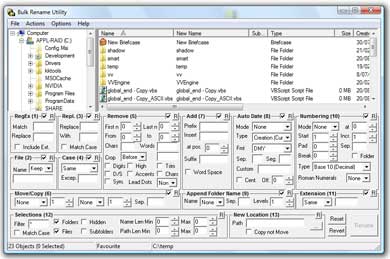
The BULK RENAMING UTILITY is a piece of free software that I use all the time. I use it mostly for photos that I download from my digital camera. I want to take 50 or 100 photos and add "2008-PattonFamilyReunion" to all the "IMG_5678" names. Come to think of it, I'll just clip that "IMG_ " part of the filename right off all those same filenames. I can do that easily, with just a few keystrokes with the renaming program.

You might collect student assignments in the form of electronic files. You may want to add "Fall-08-Report-01-" to each filename that you've collected in your file folder. That way, when you need to go back and find something, you can. Or it's grading time and you know how fried your brain gets while your grading and you want an easy way to find all the files for Report 1.

To download and use this free software just click the link:

Don't forget to download the PDF manual and save it somewhere you can find it later. But honestly, it's so intuitive and easy to use that I've never had to open the manual!

Although the software is free . . . donations are welcome at the software website.

I'm assembling a list of free software at The A&P Professor website . . . please send me your favorite examples of free software that you use in teaching your courses!
Screenshot of the Bulk Rename Utility main screen.
There are a LOT of options in renaming files . . . prefixes, suffixes, character substitutions, numbering, and more . . . but you don't have to use them all.